

LEI certificate download
Download your LEI certificate PDF for bank onboarding, KYC reviews, or reporting requests. Use your LEI code, order reference, or company name to retrieve a certificate and confirm status, issuer, and renewal dates before you share it.
I have an LEI issued through GlobalLEI
Use your order reference, LEI code, or email to download a premium certificate with a full LEI record copy. The PDF is suitable for bank onboarding and audit requests.
Download with your LEII have an LEI from another agent
You can still download the free LEI certificate with essential data. If you need the premium certificate or managed renewals, transfer the LEI to GlobalLEI first.
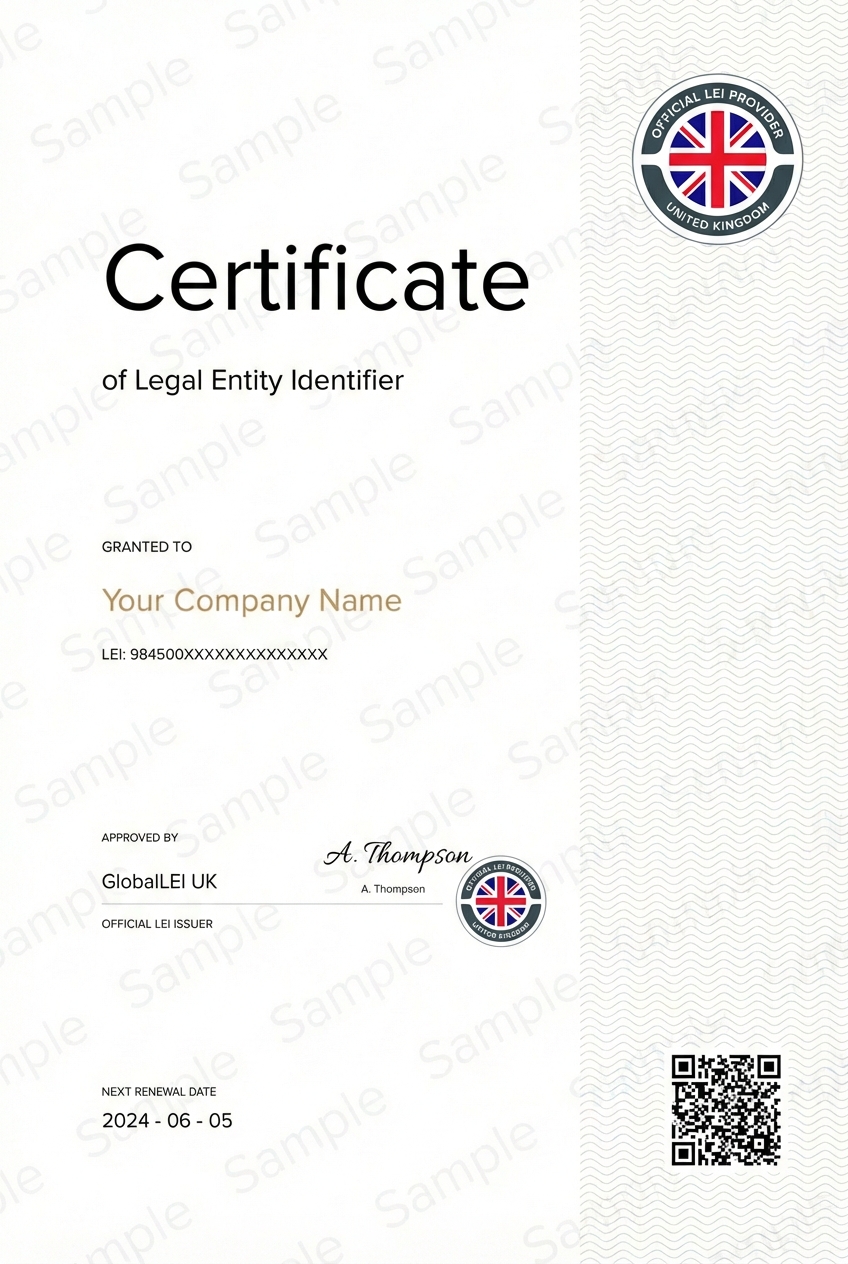
Redacted sample certificate showing the data fields banks and counterparties expect.
Download your LEI certificate
Search by LEI code, order reference, or company name. Choose a free certificate for essential LEI data or a premium certificate that includes the full LEI record copy.
What an LEI certificate is and when it is used
An LEI certificate is a PDF summary of the public LEI record. Banks, auditors, and counterparties use it to confirm the legal entity name, status, and issuer. It is a common requirement in onboarding packs, KYC checks, and regulatory reporting.
Certificates are often requested before payments or trading activity. Having a current certificate ready can reduce back-and-forth with compliance teams and speed up approval timelines.
There are two common formats: a free certificate with essential data and a premium certificate that includes the full LEI record copy. Both are delivered as PDFs and can be attached to onboarding packs, counterparty confirmations, or audit files.
Most banks accept a digital PDF, so you can email the certificate or upload it to onboarding portals. Save the latest version in your compliance folder and refresh it after a renewal or a legal name or address change.
The certificate reflects the public LEI record at the time it is issued. If your record was updated recently, download a new certificate so the dates, issuer, and reference data match the latest GLEIF entry.
How to download your LEI certificate
Download by LEI code
Enter the 20-character LEI code to retrieve the record instantly. This is the most reliable method and returns a single entity. Use it when you already know the LEI.
Download by order reference
If you registered through GlobalLEI, the order reference or confirmation email can be used to find the LEI and send the certificate. This is helpful when the LEI code is not immediately available.
If you only have an entity name, use the search option and confirm the correct record before requesting the certificate. Matching the country and registration authority ID helps avoid picking the wrong entity.
Troubleshooting access
If you cannot find your record, check spelling, remove punctuation, or search with the registered legal name. Some records may take time to appear in the public index. If the LEI is still missing, contact support with your LEI, entity name, and email.
What information appears on the certificate
Entity name and registration references
The certificate includes the legal entity name, registration authority reference, and country. This ensures the certificate can be matched to official registries and onboarding documents.
Issuer and LOU details
Issuer details show which LOU validated the record. Banks often check the issuer to confirm the LEI is maintained by an authorised GLEIF-accredited organisation.
Status and record dates
Certificates display status, last update, and the next renewal due date. These dates act as the practical validity window for compliance checks.
The LEI certificate format is designed for quick review. The LEI code, entity name, and issuer details appear at the top, with reference data and dates below. This layout helps reviewers find the key fields in seconds.
If your certificate shows lapsed status
Renewal link and timing
A lapsed status means the annual renewal was missed and the record may be outdated. Renewing restores active status and updates the data. Start renewal early if you need the certificate for a payment or onboarding deadline.
Use the renewal form to update the record and receive a refreshed certificate once validation is complete. Renew LEI.
If your LEI is managed by another LOU and you need premium certificates, transfer the LEI first. Transfers are free and keep the LEI active throughout the process. Transfer LEI.
If you cannot download a certificate
Support options and what to provide
If the download fails, contact support with the LEI code, legal entity name, and the email address associated with the order. This helps us locate the record quickly and deliver the correct certificate.
If the email does not arrive, check spam or quarantine folders and ask your IT team to allow PDF attachments from our domain. Automated messages can be blocked by corporate filters, so allowlisting the sender or using a shared mailbox helps.
For verification questions, use the LEI verification tool to confirm status and issuer details before you share the PDF. Verify LEI.
LEI certificate download FAQ
How do I download my LEI certificate PDF?
Enter the LEI or order reference and select a certificate type. The PDF is sent to your email.
Can I download an LEI certificate for free?
Yes. The free certificate is available for all LEIs and contains the essential fields.
Does the certificate show an expiry date?
Yes. The certificate shows status and the next renewal due date.
What should I do if I cannot find my order?
Try the LEI code or company name. If the record is missing, contact support with your details.
Can I download a certificate for an LEI issued elsewhere?
Yes. Free certificates are available for all LEIs. Premium certificates require a transfer.
Need to renew or transfer your LEI?
Keep your certificate valid by renewing the LEI on time or transferring it to GlobalLEI for a single point of contact.